Car Play Auto Link for Android
- 0.0
- Rating
- 10.00K
- Installs
- Free
- Price

 Analysis by App-foxy
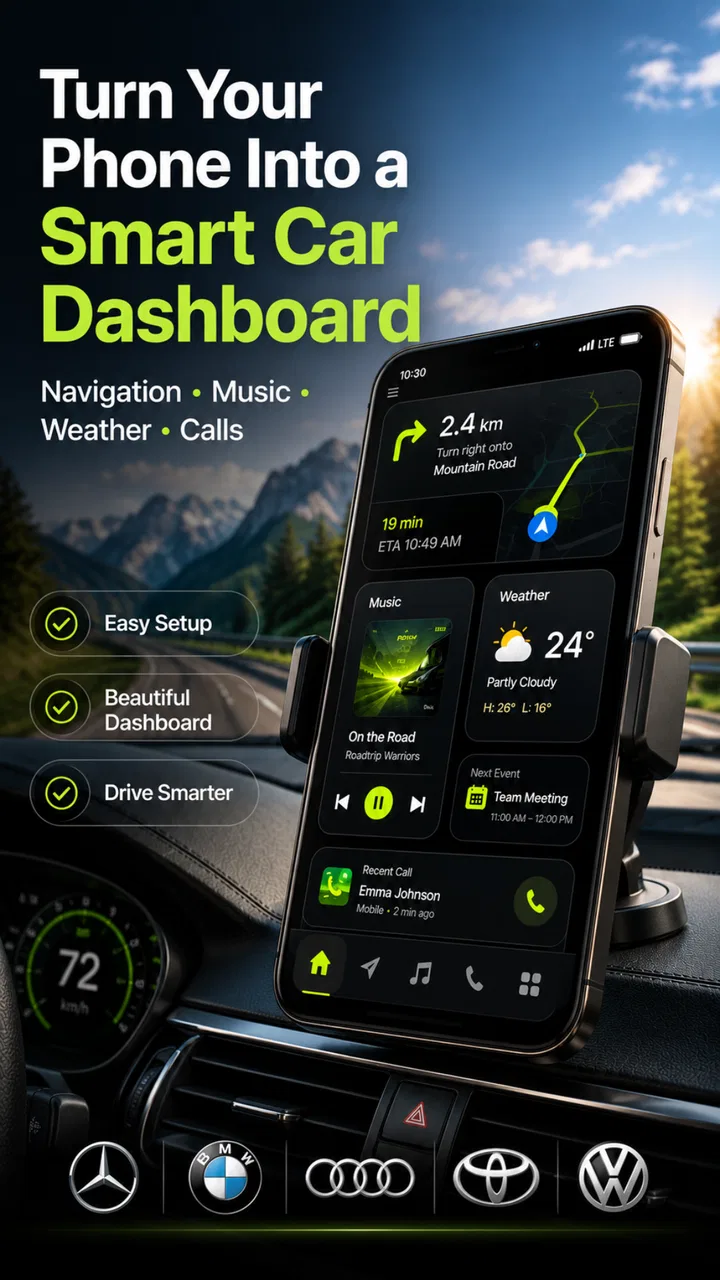
I spent time with Car Play Auto Link as a dashboard companion for Android, and my first impression is that it is trying to solve a very practical problem: bringing the parts of a phone I actually need in the car into one driving-focused space. Instead of jumping between a navigation app, a music player, a weather screen, and a parked-car note, the app places those jobs under one roof. That sounds simple, but the value depends heavily on how smoothly it fits into your daily routine.
Developed by DUCSTUDIO, this free Auto & Vehicles app is aimed at people who want their Android phone to feel more useful behind the wheel. It is available for users on Android 8.0 or later, carries an Everyone age rating, and its current version is 1.13. There are optional in-app purchases ranging from $3.99 to $54.99 per item, so the basic entry point is easy, while some extras may require spending.
My overall view is that Car Play Auto Link works best as a focused driving workspace, not as a complete replacement for every specialist app on your phone. Its appeal comes from combining several everyday car tasks, but that convenience also means you should not expect each individual tool to be as deep as a dedicated navigation, weather, music, or vehicle app.
You May Also Like

 Blood Strike: 2.5 Anniversary
Blood Strike’s Loadouts Turn Every Drop Into a Tactical Gamble
A close look at Blood Strike’s custom loadouts: how fast access to signature weapons reshapes its battle royale rhythm, rewards preparation, and narrows the gap between fights.

 Pandora - Music & Podcasts
Pandora’s Music Is Easy to Start, but Harder to Recover
Pandora’s strength is its low-effort path from a seed to a station. Its weak spot is how much confidence it asks you to place in connection, setup, and quiet recovery.

 8 Ball Pool
8 Ball Pool Is Built on Rivalries, Rematches, and Routine
A close look at the rivalries, rematches, shared routines, and unanswered safety questions that turn a quick pool match into a persistent mobile community.

 Samsung Music
Samsung Music’s Quiet Strength Is Playing What You Already Own
Its reach comes less from spectacle than from dependable access to a personal library. That simplicity is both the app’s strongest retention engine and its ceiling.

 AccuWeather: Weather Radar
AccuWeather Review: A Quick, Clear Forecast for Everyday Decisions
For everyday plans, the best forecast is the one you can understand quickly. AccuWeather makes rain timing, radar, and local conditions easy to act on, with a few trade-offs.

 Hill Climb Racing
Why Hill Climb Racing Still Turns Crashes Into One More Run
A tiny car, a bumpy hill and one more upgrade: Hill Climb Racing keeps resurfacing because its simple chaos makes every near-miss feel personal.
More From Our News Desk



How Car Play Auto Link feels in everyday driving
I find a shared household car is where a dashboard app can quietly earn its keep: one driver can set up a familiar routine, while another can use the same phone-based workspace for a different trip. In this section, I look at what that shared use feels like in practice and why a little preparation helps more than trying to coordinate while the car is moving.
A dashboard built around the tasks that matter most
The central idea is easy to understand. When I am preparing to drive, I usually want three things immediately: a route, something to listen to, and enough information to judge the conditions outside. A parked-car finder adds a fourth feature that becomes surprisingly useful in unfamiliar places. Car Play Auto Link puts these needs into a single car-oriented experience rather than making me assemble the dashboard myself.
That arrangement is particularly helpful before leaving a shopping center, airport, hospital, or large public venue. I can think about the journey instead of remembering where I left the car and then opening several separate apps. The app’s usefulness is therefore less about one spectacular feature and more about reducing small moments of friction.
It also makes sense for drivers who do not want to customize a complicated setup. Dedicated alternatives can be excellent, but they often require deciding which navigation service, music service, weather source, and parking tool should work together. This app offers a simpler starting point. If your expectations are modest and your priority is convenience, that unified approach is its strongest argument.
A realistic morning commute
Imagine leaving home on a weekday morning. I would open the dashboard before pulling away, check the route, glance at the weather, and start audio from the same general workspace. On arrival, I would use the parked-car function so that the return trip does not depend on memory. Later, when I am walking through a busy parking area, that saved location can be more useful than it sounds.
The important habit is to set things up while parked. Navigation destinations, music choices, and any parking marker should be handled before moving. That is not a special limitation of this app; it is simply the safer way to use a phone in a vehicle. Car Play Auto Link can organize the information, but it cannot remove the need for responsible driving.
For a short commute, I might not need every part of the dashboard. For a longer trip, the combination becomes more worthwhile because the app gives me a consistent place to begin. That consistency is a genuine benefit for people who dislike switching between unrelated screens.
Navigation is useful, but convenience has a trade-off
The navigation element is likely to be the first reason many people try the app. A dashboard that puts directions beside music and weather feels more natural in a car than a general phone home screen. I like the idea of keeping the driving context visible rather than treating navigation as an isolated activity.
Still, I would not automatically abandon a navigation service that already understands my preferred routes, saved places, traffic patterns, transit options, or offline needs. Specialist navigation apps often provide a deeper set of tools because navigation is their entire purpose. Car Play Auto Link is more attractive when you want a central control point, not when you need the most advanced route planning available.
My practical advice is to compare the app with your current navigation routine during ordinary trips first. If it gets you to the information you need with fewer taps, it may become your preferred dashboard. If you regularly depend on highly detailed route options, a dedicated navigation app may remain the better choice, with this app serving as a convenient companion.
Music access without losing the driving context
Music is another area where integration matters more than novelty. I appreciate a dashboard that lets me begin listening without leaving the car-focused environment. The benefit is strongest when I already know what I want to play and simply need quick access before driving.
There is a trade-off here too. A dedicated music application usually offers richer library management, recommendations, playlists, downloads, and account-specific controls. Car Play Auto Link should be judged by how efficiently it connects the listening part of a drive to the rest of the dashboard, rather than by whether it replaces a full music service.
I would prepare playlists or albums before setting off, especially for longer journeys. That workflow reduces distraction and makes the integrated music control more useful. If you spend most of your time browsing new music while driving, no dashboard arrangement can make that a good habit; the safer approach is to choose audio while stationary.
Weather information in the right context
Weather becomes more valuable when it is viewed as part of a trip rather than as a separate daily check. A quick look before leaving can influence whether I take a longer route, allow more time, or bring something I would otherwise forget. Having weather near navigation makes that decision feel connected to the drive.
At the same time, I would treat the weather panel as a quick planning aid rather than a replacement for careful judgment. Conditions can change between departure and arrival, and a glance at a dashboard should not encourage anyone to interact with the phone while moving. The feature is most useful before departure and during a safe stop.
The parked-car finder is the quiet standout
Of the advertised functions, the parked-car finder may be the one I would use most consistently because it solves a problem that navigation and music do not. In a large parking structure, an unfamiliar neighborhood, or a crowded event area, remembering the exact location of a car is easy to underestimate until the return walk begins.
The best workflow is to mark the location immediately after parking, while the detail is still fresh. I would also make a mental note of the floor, section, or nearby landmark when possible. A digital marker can help guide the return, but combining it with a simple visual memory is more reliable than depending on one method alone.
This is a useful example of a feature that looks secondary in a store summary but can have a strong everyday effect. It does not need to be used on every journey to justify its place in the dashboard. A single stressful search through a large car park can make the shortcut feel worthwhile.
What version 1.13 means for current users
With version 1.13 as the current point of reference, I would focus less on the number itself and more on whether the app still fits the way I prepare for a drive. This section considers how existing users can keep their routine predictable, especially when a phone is used by more than one person, and why testing changes while parked is a sensible habit.
The present version gives the app a clear identity
Car Play Auto Link is currently at version 1.13, which tells me the product has moved beyond the earliest rough concept and is being presented as a defined dashboard tool. I would still avoid reading that number as a promise of maturity across every function. A version label alone cannot tell me how polished each screen feels or how well the app behaves with every phone, vehicle, and driving setup.
What is clear from the current product direction is the focus on combining navigation, music, weather, and parked-car assistance. That combination gives the app a recognizable purpose. It is not trying to be a general productivity tool or a broad vehicle maintenance platform; it is centered on the moments before, during, and after a drive.
The app was released on June 16, 2026, and the current version is the relevant starting point for anyone installing it now. Existing users should approach updates as opportunities to check whether their personal routine still feels smooth, especially if they rely on the app for a regular commute. A change that improves one dashboard area can sometimes alter how quickly another task is reached, so it is worth noticing the whole flow rather than focusing on a single button.
How existing users can get more from it
If you already use the app, I would organize your routine around preparation rather than improvisation. Set the destination before moving, choose audio in advance, and use the parking marker at the moment you leave the car. These small habits make the combined dashboard feel intentional instead of turning it into another screen to manage while driving.
A second useful habit is to decide what you really need visible for each kind of trip. On a familiar commute, navigation may be less important than quick audio access. In an unfamiliar city, the route and parking location may matter more. Treating the dashboard as a flexible starting point helps prevent the app from becoming visual clutter.
I would also test it on a calm, familiar journey before trusting it for a long trip. That gives you time to learn where the main controls are, how the parking workflow fits your habits, and whether the overall presentation is comfortable to read. The goal is not to explore every option once the car is moving; it is to make the important actions predictable beforehand.
Where the app still has gaps
The biggest limitation is the unavoidable compromise between breadth and depth. Bringing four driving-related tasks together is convenient, but it does not automatically provide the full capability of four specialized apps. Someone who needs advanced route planning, extensive music discovery, detailed weather analysis, or highly sophisticated parking guidance may find the individual tools too basic for their needs.
There is also a question of dependence on the phone and the surrounding setup. A dashboard app can organize your experience, but it does not by itself guarantee a particular vehicle connection, screen integration, audio arrangement, or navigation behavior. Before making it central to every journey, I would confirm that it fits the way I already use my Android phone in the car.
The optional purchase structure deserves attention as well. The app is free to start, but in-app items cost from $3.99 to $54.99 each. That wide range means I would inspect what each purchase changes before paying. A free download is attractive for testing, but the total value depends on whether the functions you care about are available without a purchase and whether any paid additions genuinely improve your routine.
Another limitation is that convenience can encourage overuse. A dashboard with several categories may tempt drivers to keep checking information that could wait. I would use it as a preparation tool and a quick reference, not as an invitation to interact constantly with the phone. If you want a completely hands-off experience, a native vehicle system or a well-established voice-first setup may suit you better.
Who should use it, and who should skip it?
I would recommend trying Car Play Auto Link if you want a single Android dashboard for ordinary driving tasks, especially if you frequently move between navigation, audio, weather, and parking information. It is also a sensible option for drivers who find separate apps inconvenient or who often forget where they parked in unfamiliar places.
It is less suitable for someone who already has a polished vehicle interface and a trusted collection of specialist apps that work exactly as desired. In that situation, adding another layer may create more steps rather than fewer. I would also skip it if your main requirement is one advanced function, such as highly detailed navigation or deep music management, because a dedicated app will probably remain stronger in that narrow role.
The Everyone rating makes the app broadly approachable, but that does not mean every driving situation is appropriate for phone interaction. New users should learn the interface while parked and keep attention on the road. The rating describes general content suitability, not a substitute for safe driving judgment.
What I would watch as the product develops
For future updates, I would pay attention to refinement rather than simply counting new buttons. The most valuable progress would be smoother movement between navigation, audio, weather, and the parking workflow. A dashboard succeeds when it reduces decisions, so clearer transitions and dependable access matter more to me than adding unrelated features.
I would also watch how the app handles the difference between a quick glance and a task that requires interaction. The best car-focused design makes the important information easy to recognize before a journey and discourages unnecessary attention once the vehicle is moving. Improvements in that area would strengthen the app’s practical identity.
Another point to monitor is the balance between the free experience and the paid items. Since the app can be installed without an upfront price, users can judge the basic workflow for themselves. Future changes will be most convincing if optional purchases feel like meaningful enhancements rather than barriers placed around the core reason to use the dashboard.
Finally, I would look for continued attention to the parked-car feature. It is the kind of tool that can become a daily habit when it is quick and dependable. Better integration between the moment of parking and the moment of returning could make this less obvious feature one of the app’s clearest long-term advantages.
My final take after using the dashboard concept
Car Play Auto Link has a practical idea at its center: make an Android phone more useful in the car by gathering the information I need around a journey. Its combination of navigation, music, weather, and parked-car finding gives it a purpose that is easy to understand, and the parking tool adds real value beyond the usual driving dashboard.
I would not describe it as a universal replacement for every specialist alternative. The right choice depends on whether convenience and centralization matter more to you than advanced depth in one category. For my own use, I would keep the app in consideration as a straightforward dashboard companion, test it on familiar trips, and judge the optional purchases carefully before making it part of a larger routine.
With a free starting point, support for Android 8.0 and later, and a current version of 1.13, it is accessible to a broad group of Android drivers. My recommendation is simple: try it if your current setup feels scattered, prepare it while parked, and focus on whether it genuinely removes steps from your drive. If it does, Car Play Auto Link earns its place as a useful everyday tool rather than just another app on your phone.
FAQs for Car Play Auto Link for Android
01What is Car Play Auto Link for Android, and what does it do?
Car Play Auto Link is an Android companion app designed to help connect a compatible smartphone with a vehicle’s infotainment system. Depending on the car, head unit, and phone model, it may mirror or provide access to selected phone functions such as navigation, music, calls, and notifications. Its exact features can vary, so users should check compatibility before downloading.
02Is Car Play Auto Link compatible with every Android phone and car?
No. Compatibility depends on several factors, including the Android version, USB or wireless connection support, the vehicle’s multimedia system, and whether the car head unit supports the required mirroring or projection technology. Some devices may connect successfully while others may show limited functionality. Before installing, check the app listing and your vehicle manufacturer’s documentation for supported models.
03Does Car Play Auto Link require a USB cable, or can it work wirelessly?
The connection method depends on the vehicle and the version of the app being used. Some setups require a reliable USB data cable, while compatible head units may support a wireless connection through Bluetooth and Wi-Fi. A charging-only cable may not work for wired setup. If pairing fails, users should enable the requested permissions, restart both devices, and try a high-quality cable.
04What permissions does Car Play Auto Link request, and are they necessary?
The app may request access to Bluetooth, Wi-Fi, location, notifications, contacts, phone calls, storage, or other device functions needed for connectivity and in-car controls. These permissions can be necessary for features such as hands-free calling, navigation, media playback, and displaying notifications. Users should review each permission carefully and deny anything that does not appear relevant to the intended connection.
05Is Car Play Auto Link safe to use while driving, and what should users know?
The app is intended to make selected smartphone features easier to access through a vehicle display, but it should never encourage distracted driving. Drivers should configure the connection, navigation route, and permissions before moving, and use voice controls or hands-free features whenever possible. Availability and behavior can differ between cars, so always follow local traffic laws and the vehicle manufacturer’s safety instructions.
Pros
- Simple setup for compatible Android phones and car displays.
- Supports hands-free calling through the vehicle’s controls.
- Makes navigation apps easier to access while driving.
- Can stream phone audio through the car’s speakers.
- Keeps key phone functions visible on a larger screen.
Cons
- Compatibility varies widely between phones
- cars
- and head units.
- Some features may require a wired USB connection.
- Connection stability can depend on the cable and vehicle software.
- May use significant battery during navigation and media playback.
- Privacy permissions are needed for calls
- contacts
- and location data.

Car Play Auto Link for Android
Gallery